Prepare a consistent first-pass report before deciding whether the site deserves a full audit.
Industrial energy audit report generator
Turn site-readable energy data into a structured pre-audit report.
kWhScan helps energy consultants, ESCOs, solution engineers and facility teams prepare a client-ready industrial energy pre-audit report faster. Start with a free diagnosis preview, then unlock the complete downloadable report only when the finding is useful.
- Built for early opportunity screening before a detailed site audit or retrofit proposal.
- Uses bills, meters, nameplates, controller readings and optional time-series exports.
- Outputs baseline, savings, system contribution, measure priority, calculation notes and M&V guidance.
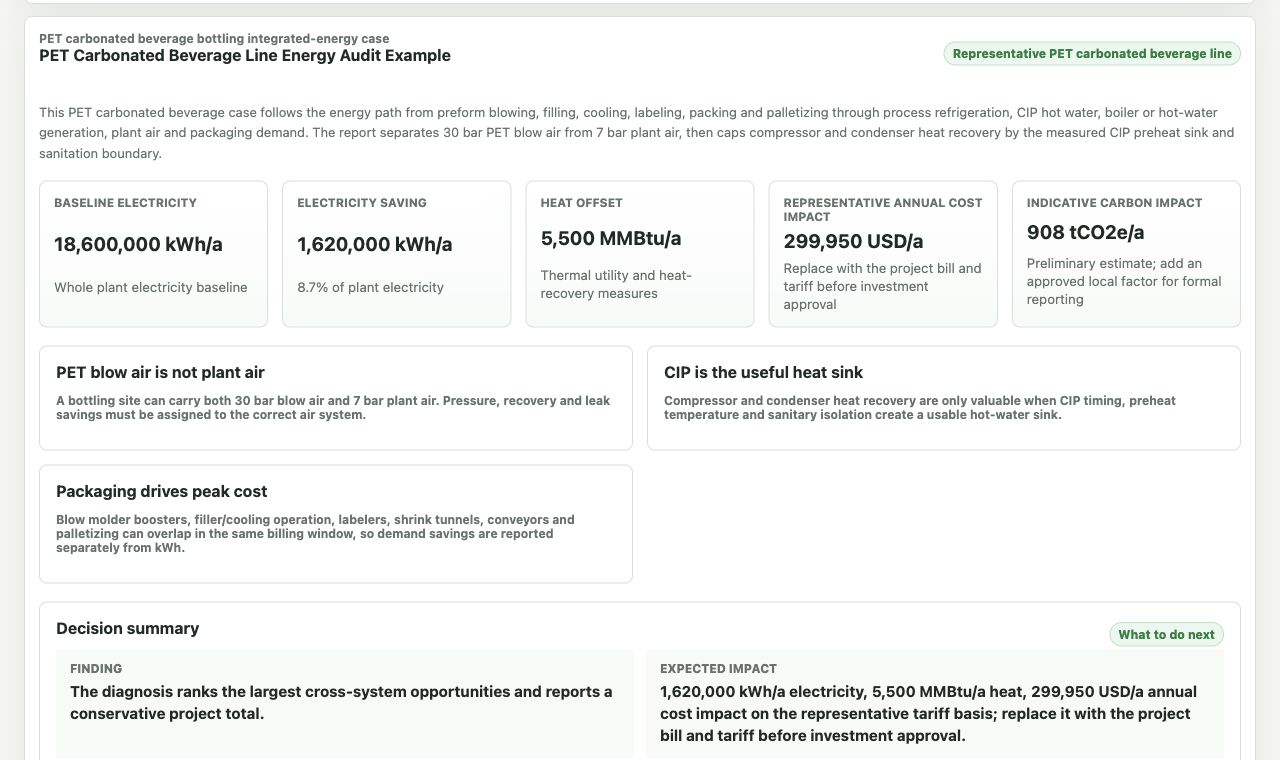
Actual report output
From site data to a customer-ready decision summary.
Review the baseline, quantified impact, priority actions and next measurement requirements before downloading the report.
Who it is for
A practical report workflow for teams that already discuss energy-saving projects.
This page is not positioned as a generic AI writing tool. It is for professionals who need to turn rough but useful site data into a structured pre-audit deliverable before spending more time on detailed measurement.
Screen opportunities and show a customer why a deeper measurement campaign is worth discussing.
Use a structured diagnosis report to support compressed air, chiller, HVAC, boiler or electrical retrofit conversations.
Convert bills, meter readings and operating observations into a clearer internal energy-saving discussion.
Manual spreadsheet summaries, unstructured AI text and calculator-only estimates that are hard to present to a client.
A formal investment-grade audit, supplier design validation, safety review or guaranteed performance contract.
Report sections
What an industrial pre-audit report should show
The report must be useful before a full audit: it should organize available data, identify likely savings, show how measures are separated and explain what needs to be measured next.
Current energy, energy cost, carbon impact and the target gap behind the diagnosis.
Savings are separated across compressed air, chiller plant, heat pump, steam or boiler, electrical and multi-energy measures.
Pressure level mismatch, capacity mismatch, low-efficiency units and inappropriate auxiliary equipment are flagged separately.
Setpoints, sequencing, unloaded running, low-load operation and avoidable peak demand are converted into specific findings.
Leakage, pressure drop, low delta-T, steam trap losses, terminal-side control waste and network losses are separated from generation-side savings.
The paid report adds calculation basis, priority measures and measurement or verification notes.
Scenario diagnosis pages
Explore deeper report and system-specific diagnosis paths.
Use the report example pages to judge the deliverable, then use the scenario pages to enter a system-specific diagnosis path.
Industrial energy audit report example
Review the report checklist: baseline, system contribution, calculation trace, implementation priority and measurement notes.
Compressed air audit report generatorUse the strongest system-specific report path for pressure, controls, equipment selection, leakage and heat recovery.
Compressed air audit report exampleSee how pressure, unload loss, equipment selection, leakage, dryer purge and heat recovery should be written.
Compressed air energy savingsPressure, control, unload loss, blow-off, leakage, dryer purge, equipment selection and heat recovery.
Chiller plant energy diagnosisBaseline COP, chiller selection, plant control, low delta-T, pump and tower control, heat recovery and free cooling.
Why it matters
Industrial energy waste is rarely caused by one isolated device.
In most plants and large facilities, energy waste is distributed across systems. A compressed air station may run at a higher pressure than the process needs. A chiller plant may show poor delta-T or unstable sequencing. A boiler room may lose heat through flue gas, blowdown, condensate return or steam traps. Electrical costs may be affected by demand peaks, power factor, transformer loading or self-use of on-site generation.
This is why many early energy reports become either too shallow or too slow. kWhScan is designed for the middle step: a structured pre-audit diagnosis that helps decide where to focus measurement, supplier discussion and retrofit design.
Data requirements
Start with field-readable data, then add time-series data when available.
The assessment is designed so that users can start with data engineers can usually obtain on site, then improve the report depth when exported operating data is available.
- Annual electricity, fuel or steam consumption.
- Average energy price and operating hours.
- Equipment rated power, rated capacity, rated pressure or temperature range.
- Current setpoints, observed pressure, supply and return temperatures, flow or demand indicators.
- Power, flow, pressure, temperature and load time series.
- Equipment status, loading state, sequencing state or controller readings.
- Production, occupancy, process or operating boundary indicators when available.
- Optional data improves control, load profile and system interaction diagnosis.
How it works
From plant data to a structured report in one workflow.
Users can enter manual data for each system and optionally import continuous operating data. After one-click diagnosis, kWhScan generates a project summary, system-level results, measure priorities and report sections.
Enter project information
Set the project region, currency, report language and energy systems included in the site.
Fill field-readable data
Use bills, meters, nameplates, controller readings and observed operating values.
Add time-series data when available
Import operating data for deeper diagnosis of control, load profile and system interaction.
Run one-click diagnosis
The assessment calculates project summary, system-level opportunities and top measures.
Review the diagnosis
Check the project-level saving signal, main system contribution and top findings.
Download the full report
During the public beta, download the complete report free with no login or email required.
Sample output
Review the sample report before entering your own data.
The sample integrated-energy report shows how the diagnosis is presented to a customer: baseline electricity, annual savings, saving rate, cost impact, system contribution, top measures, calculation basis and implementation notes.
Report unlock
Free screening first. Paid report only when it is useful.
The free diagnosis answers the first question: does this site show a meaningful energy-saving signal? The paid unlock is for the complete engineering report and download access.
- Project-level saving signal.
- Main system contribution.
- Top findings.
- Basic direction for next measurement.
- Detailed engineering report.
- Calculation trace and engineering basis.
- Measure-by-measure recommendations.
- Implementation and measurement notes.
- Download access.
Use cases
Built for early-stage energy opportunity screening.
kWhScan is useful for plant managers, facility managers, energy consultants, ESCO teams, retrofit suppliers and engineering teams that need to prepare a structured pre-audit report before committing to a full measurement campaign or detailed retrofit study.
It is not a replacement for a formal investment-grade audit, safety review, compliance certification or guaranteed performance contract. It is a practical way to identify and prioritize energy-saving opportunities from available site data.
FAQ
Common questions
Is this a formal investment-grade energy audit?
No. It is a structured pre-audit diagnosis that helps identify and prioritize energy-saving opportunities before commissioning a detailed audit or retrofit study.
Do I need time-series data?
No. You can start with field-readable data. Time-series data improves the depth of the report, especially for control, load profile and system interaction analysis.
Can it be used outside China?
Yes. International projects use an international reference basis when local rating tables are not connected. The report states the reference basis and calculation boundary.
What do I get after payment?
You unlock the detailed report sections, calculation trace and report download for the diagnosis result.
Is this only for compressed air?
No. Compressed air is currently the deepest reference scenario, but the assessment also covers chiller plants, heat pumps, steam and boiler systems, electrical systems and multi-energy opportunities.
Generate your first free diagnosis.
Use the assessment as a low-risk way to see whether a site has a real energy-saving signal.